I didn’t come up with this code, but it is pretty cool.
It shows how to parse a JSON string with VBA.
The impetus for this was to access the price data for various coins on coinmarketcap.com
…and to get the price data for 50+ coins required getting a coinmarketcap api, and resulted in a JSON string.
I just included the essential stuff below, maybe it will help you out too.
Go here for more information: https://medium.com/swlh/excel-vba-parse-json-easily-c2213f4d8e7a
'-------------------------------------------------------------------
' VBA JSON Parser
'-------------------------------------------------------------------
Option Explicit
Private p&, token, dic
Function ParseJSON(json$, Optional key$ = "obj") As Object
    p = 1
    token = Tokenize(json)
    Set dic = CreateObject("Scripting.Dictionary")
    If token(p) = "{" Then ParseObj key Else ParseArr key
    Set ParseJSON = dic
End Function
Function ParseObj(key$)
    Do: p = p + 1
        Select Case token(p)
            Case "]"
            Case "[":  ParseArr key
            Case "{":  ParseObj key
            Case "{"
                       If token(p + 1) = "}" Then
                           p = p + 1
                           dic.Add key, "null"
                       Else
                           ParseObj key
                       End If

            Case "}":  key = ReducePath(key): Exit Do
            Case ":":  key = key & "." & token(p - 1)
            Case ",":  key = ReducePath(key)
            Case Else: If token(p + 1) <> ":" Then dic.Add key, token(p)
        End Select
    Loop
End Function
Function ParseArr(key$)
    Dim e&
    Do: p = p + 1
        Select Case token(p)
            Case "}"
            Case "{":  ParseObj key & ArrayID(e)
            Case "[":  ParseArr key
            Case "]":  Exit Do
            Case ":":  key = key & ArrayID(e)
            Case ",":  e = e + 1
            Case Else: dic.Add key & ArrayID(e), token(p)
        End Select
    Loop
End Function
'-------------------------------------------------------------------
' Support Functions
'-------------------------------------------------------------------
Function Tokenize(s$)
    Const Pattern = """(([^""\\]|\\.)*)""|[+\-]?(?:0|[1-9]\d*)(?:\.\d*)?(?:[eE][+\-]?\d+)?|\w+|[^\s""']+?"
    Tokenize = RExtract(s, Pattern, True)
End Function
Function RExtract(s$, Pattern, Optional bGroup1Bias As Boolean, Optional bGlobal As Boolean = True)
  Dim c&, m, n, v
  With CreateObject("vbscript.regexp")
    .Global = bGlobal
    .MultiLine = False
    .IgnoreCase = True
    .Pattern = Pattern
    If .test(s) Then
      Set m = .Execute(s)
      ReDim v(1 To m.Count)
      For Each n In m
        c = c + 1
        v(c) = n.Value
        If bGroup1Bias Then If Len(n.submatches(0)) Or n.Value = """""" Then v(c) = n.submatches(0)
      Next
    End If
  End With
  RExtract = v
End Function
Function ArrayID$(e)
    ArrayID = "(" & e & ")"
End Function
Function ReducePath$(key$)
    If InStr(key, ".") Then ReducePath = Left(key, InStrRev(key, ".") - 1) Else ReducePath = key
End Function
Function ListPaths(dic)
    Dim s$, v
    Dim intRow As Integer

    For Each v In dic
        s = s & v & " --> " & dic(v) & vbLf
    Next
    Debug.Print s

End Function

'This is my contribution!
Sub StartHere()
    Dim strURL As String

    strURL = ThisWorkbook.Path & "\currencies.txt"

    Dim strFileContent As String
    Dim intFile As Integer

    intFile = FreeFile
    Open strURL For Input As #intFile
    strFileContent = Input(LOF(intFile), intFile)
    Close #intFile

    Set dic = ParseJSON(strFileContent)
    Debug.Print ListPaths(dic)
End Sub
Go to this post to see the post for the Load Text File:
http://www.vbastring.com/blog/how-to-load-a-text-file-in-excel-vba-with-load-data-infile/
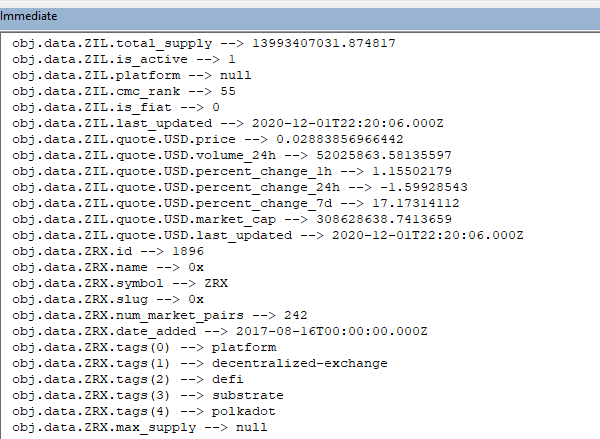
Here is a bit of the input file and the same bit when run through the parser: